
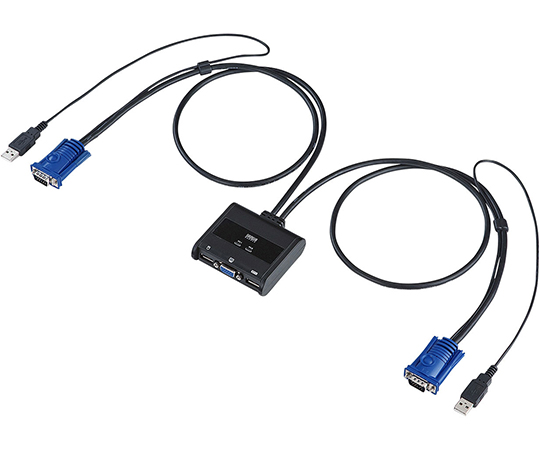
SANWA SUPPLY SW-KVM2UUN PC automatic switch 2:1
| Manufaturer: | SANWA SUPPLY |
| Model: | SW-KVM2UUN |
Product code
111-60557
Price
109.66 USD
*The above price is Standard Price, Kindly click on Request a quote  to unlock Competitive Pricing and Delivery Dates - Check Availability. Our expert consulting team is always ready to assist you within one business day.
*Order Process: 1. Request a quote ⇒ 2. Quote via Email ⇒ 3. Proforma Invoice ⇒ 4. Payment ⇒ 5. Delivery and Invoice.
*We deliver to your doorstep under DAP terms. Customs clearance is for your account.

*You can't find the product you need, please send us the picture/specifications/model/product code and quantity you need to email: [email protected]. We will find it for you.
*Review us here: Review Now 
Description
- An automatic PC switcher that can switch and share one set of USB keyboard, USB mouse, and display, and is also compatible with laptop computers.
- One set of USB keyboard, USB mouse and display can be used by switching between two computers.
- As it is a compact type with an integrated cable, it does not take up much space when installed.
- Hotkeys can be selected from [Ctrl] x 2 times or [Scr, Lock] x 2 times, and you can avoid overlapping hotkeys in your software.
- The console can be switched while the power of the connected PC is turned on.
- Since it emulates the keyboard port, complete startup is possible without switching the port when restarting (rebooting).
- It is possible to start two connected computers at the same time.
- No software installation is required and you can switch between them just by connecting them.
- It is possible to monitor each computer by automatically switching the connected computers with the auto scan function.
- Up to high resolution 2048 x 1536 dots can be displayed.
- No AC adapter is required as the power is supplied from the computer's USB port.
- Compatible computers: DOS/V desktop or laptop computers, Apple Mac series (models with USB A connector female, mini D-sub (HD) 15pin display connector)
- Compatible keyboard: USB keyboard
- *1, 2, 3
- Compatible mouse: USB mouse
- *3
- Compatible display: Multi-scan display with mini D-sub (HD) 15pin connector
- Supported resolution: Up to resolution 2048 x 1536 dots can be displayed. (DDC2B compatible)
- Supported OS: Windows 8.1, 8, 7, Vista, XP (32/64bit, each Editon compatible) Windows Server 2012 (R2), Windows Server 2008 (R2), Windows Server 2003 (R2) Mac OSX, MacOS 9.0 or later Linux (CentOS , ubuntu, OpenSUSE)
- Interface <For PC>: Display: Mini D-sub (HD) 15pin male x 2, USB A connector male x 2 (shared with mouse) <For console> Display: Mini D-sub (HD) 15pin female x 1 Keyboard: USB A connector female x 1 Mouse: USB A connector female x 1
- Switching method: Hotkey switching (switching between computers A and B): Press the [Ctrl] key twice in succession (but the same Ctrl key) or press the [ScrLock] key twice in succession (either Selection)
- Power consumption: Operating voltage - Power supply from USB port: DC +5V Current consumption: 280mA (maximum)
- Operating temperature/humidity: 0 to 40°C Humidity 80% or less (no condensation)
- Storage temperature/humidity: -20°C to 60°C Humidity 80% or less (no condensation)
- Size: W77.99 x D72 x H24.35mm (body size)
- Weight: 252g
- Cable length: 0.9m
- Accessories: Instruction manual (with warranty) Note
- *1 The USB hub port on the keyboard cannot be used via this product. Functions that require a driver, such as special buttons on the keyboard, cannot be used via this product.
- *2 It may not work with a keyboard with a fingerprint authentication function or a keyboard with a trackpad.
- *3 Bluetooth keyboards and Bluetooth mice are not supported. please note
- We do not guarantee the operation of all personal computers, keyboards and mice.
- Special buttons and function keys that require driver installation on keyboards and mice may not work via this switcher.
- The one-touch button resume/suspend function is not supported.
- Keyboards with fingerprint authentication function and keyboards with touchpad function are not supported.
You may like

SHIMOJIMA 003155204 HEIKO Paper Bag (310 x 190 x 210mm, 1 pack (25 sheets))
Price:
44.99 USD

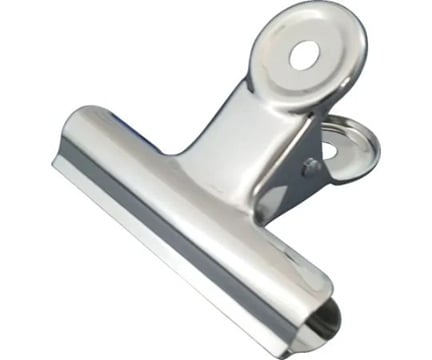
SANKEI KIKOM MD-00 Eye Clips Extra Large (75mm, 120 sheets, 1 box (10 pieces))
Price:
14.95 USD
Sign up for the newsletter - the opportunity to receive promotions